Product
One workflow from your data to a maintained passport
BatteryPass is not a form that prints a QR code. It takes your data from spreadsheets, the ERP and suppliers through checks and approval to a signed battery passport, and keeps it current over the battery's life.
Workflow
Seven steps, one tool
Each step builds on the one before. What is missing becomes a task; what has been reviewed stays traceable.
Import
Read in spreadsheets, ERP exports and serial numbers instead of retyping.
Gaps as tasks
Every missing required field becomes a task with an owner.
Evidence and suppliers
Attach documents, ask suppliers by link for exactly what is missing.
Checks and four eyes
Automatic checks, then approval by a second person.
Preview
See what the public, authorised parties and authorities see.
Publish
Signed, versioned passport with QR code and GS1 Digital Link.
Maintain
Condition data, repairs, new model versions, second life.
Data model
Model, model version and unit
Most passport data belongs to a model, not to the individual battery. That is why BatteryPass separates model, model version and unit.
When something about the model changes, such as a new declaration of conformity or a different cell, you create a new model version. Before approval you see which units it affects. Units carry only what really belongs to the individual battery: serial number, date and place of manufacture, and later condition data.
Import
Import instead of retyping
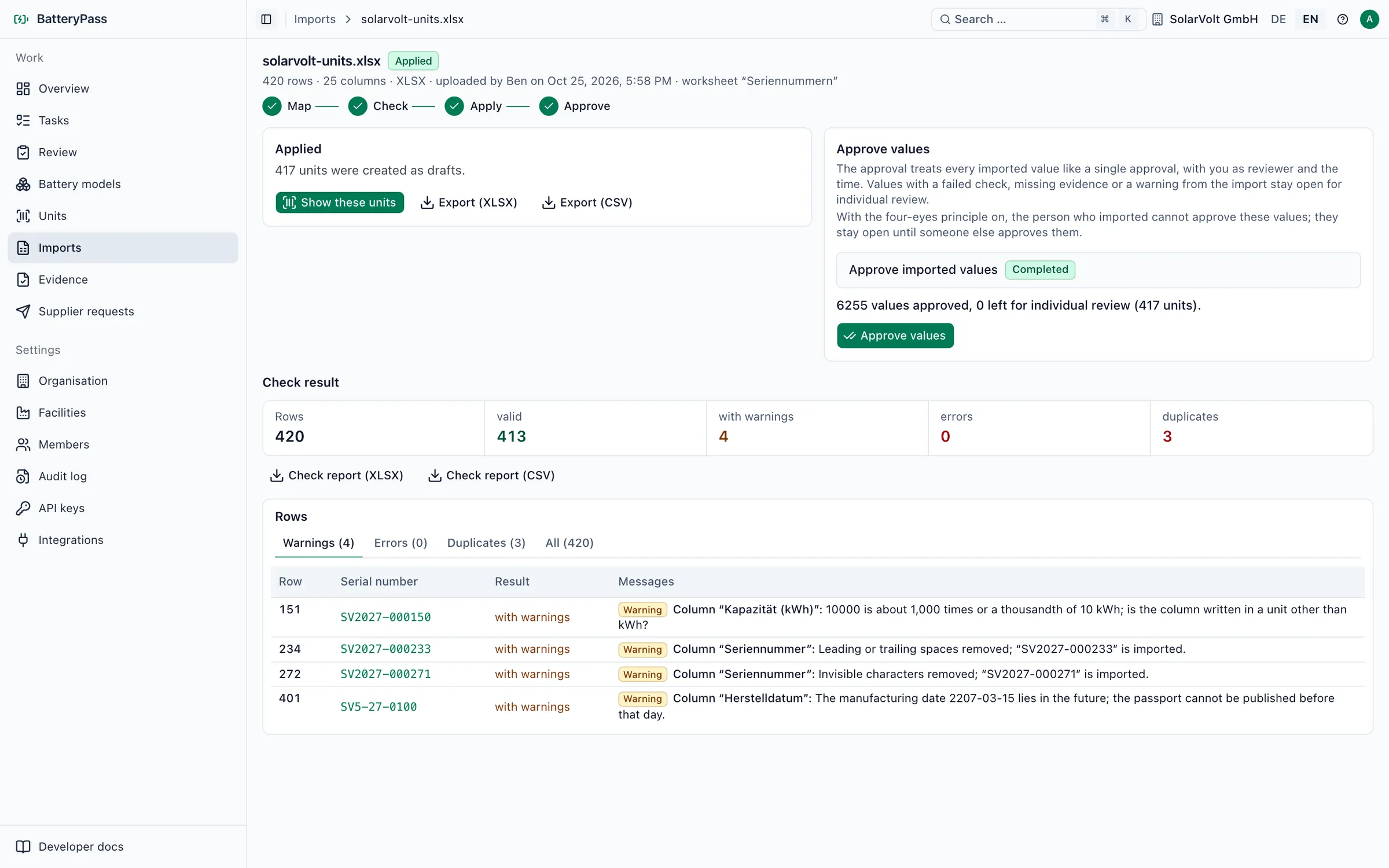
Your data already exists, in Excel spreadsheets, ERP exports and test records. BatteryPass reads it in.
Mapping from the column headers
BatteryPass proposes which column belongs to which field, also for German and English headers, and converts units such as Wh to kWh.
Row checks with an error report
Every row is checked before anything is taken over. Duplicate serial numbers and flawed values end up in a report you can correct.
Serial number ranges and templates
Units come from spreadsheets or number ranges. There are import templates per category, and the unit export uses the same format.
Closing gaps
Tasks, evidence and suppliers
Every missing required field becomes a task with an owner. It closes once the value is there and reviewed.
A task for every gap
Open required information shows up as tasks in the owners' inboxes; you can add tasks of your own.
Evidence with access tiers
Data sheets, test reports and declarations are attached to the values they prove, with revisions and their own access tier.
Supplier requests by link
Ask cell or module suppliers for exactly the fields that are missing. Reminders, cancellation and a single submission included.
Review
Automatic checks and four eyes
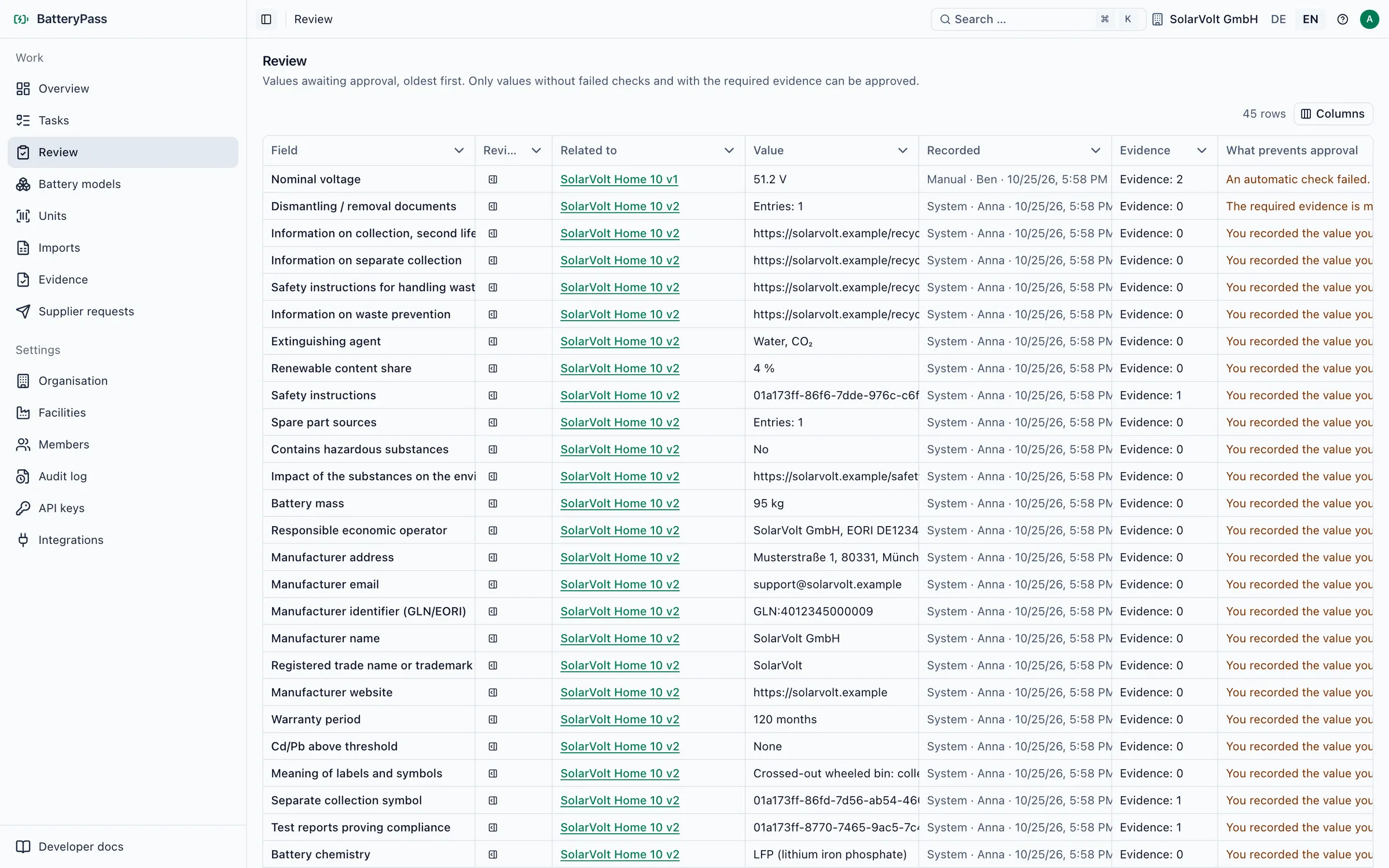
Before a value goes into a passport it is checked: automatically for format and consistency, then by a second person.
Checks from the field registry
Formats, value ranges and cross-checks, such as voltages that do not fit together, come from the versioned field registry.
Approval by a second person
Whoever entered a value cannot approve it. Required evidence and conflicting evidence block the approval.
Preview and publication
See who sees what, then publish signed
Preview per access tier
Before publishing, check what the public, persons with a legitimate interest and authorities see. The server hands each tier only its fields.
Signed versions, QR code, resolver
Every version is signed with Ed25519 and verifies offline. The QR code leads to the passport through a GS1 Digital Link; earlier versions stay retrievable by date.
Maintenance
The passport lives with the battery
Condition data
Measurements from operation come from members, from service partners by link or through the API, and are re-published at once or daily.
Events and changes
Repairs, returns and new model versions land as events with documents in the unit's history.
Second life
A repurposed, reused or remanufactured battery gets its own passport that links to the original one.
Open
Export, API and no lock-in
Frequently asked questions about the product
Which battery categories does BatteryPass support?
The data model covers every category that needs a passport: EV batteries, LMT batteries, industrial batteries over 2 kWh, stationary storage and industrial batteries without a BMS. Stationary storage, where the pilot runs, is the most thoroughly tested.
How does BatteryPass know which fields are required?
From a versioned field registry: for each field it holds the category, access tier, legal basis and requirement rule, including conditions and later dates. We checked the registry against the Battery Regulation and the Commission's guidance and document the open points.
Do suppliers need an account?
No. A supplier gets a link, sees only the fields you asked for, uploads evidence and submits once. Someone on your team reviews the data before it counts.
What happens when a model changes?
You create a new model version. Before approval BatteryPass shows which units are affected; passports already published stay unchanged until you deliberately move units.
Which formats can BatteryPass export?
Per passport, JSON in the Battery Pass consortium data model v2.0 with a report against its schema, and PDF in German and English, plus the full organisation export in a documented format.
Is there an AI assistant?
Yes, in testing: members ask about their data in plain language and let it prepare changes. Every change runs only after their approval, with their rights. The operator has to switch it on, and so does an owner per organisation.